Loading...
Searching...
No Matches
Import
Import
Presuming you have followed the steps in the export page, you should have
mymod.zipormymod.o2rplaced in the mods folder beside the game executable.- The track is ready for testing
Launch the Game
- Press
ESCand enableDebug Mode - Navigate away and back to the start screen and a debug menu should pop up. Use the left/right arrow keys to switch tracks. Custom tracks are placed at the end of the list.
- Press Launch HM64 Labs to configure your track and place actors.
- Select your track in the Content Browser
- When opening your track for the first time, a scene.json file is created in the tracks data folder.
- If something ever goes horribly wrong you could manually edit this file or back it up to restore it later.
- If the game crashes while loading, then there is an issue with track path or mesh. Check logs, they are quite detailed and may point out what is wrong.
- Navigate to the Track Properties winow to modify track name and settings
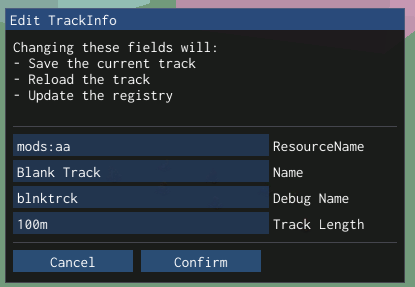
Resource Name
- Must be named identifier:track_name
- The identifier can be used as a keyword for all of your mods
- This format prevents name collisions so that everyone could make their own version of banana if they wish. mk is used for original game content and hm for harbour masters content. mk:banana, hm:harbour, etc.
Name
- The display name for the track
Debug Name
- The display name in the debug menu.
Track Length
- An arbitrary value that describes the general length of the track
Conclusion
Congrats! You have successfully made a track
If thet track did not work, try the troubleshooting page.